-
 Getting started
 -
 RVsitebuilder Overview
 -
 Creating Website
 -
 Website Blog
 -
 SEO
SEO -
 Website Email
 -
 Website Membership
 -
 RVsitebuilder Apps
 -
 Advanced
 -
 Website Management
 -
 Internationalization
 -
 Troubleshooting
 English
Creating Blog
Add New Post

A simple and easy to add your new blog post
- Current on the step Content.
- Select New Post.
Add Catagories

On step Content, click on New Post. You can click Add Category to create your own category. Also, you can select the parent category with the 3 maximum levels.
For example: If we add "Cats" category and select parent category to "Animals", a "Cats" category will be under the "Animals" folder.
Manage your Categories Index
Also, you can modify a catagories page. Clicking Site -> Blog -> Select Catagory.

Category index widget section
By Category List: Shows all your posts in the category
By Category List Setting

- Enable/Disable Category Name
- Enable/Disable Total Number of Posts
- Limit post per page
- Order by: Select Newest, Post Title or Last edit to arrage a list.
- Enable/Disable author name on each post.
- Enable/Disable post date and time on each post.
- Enable/Disable post's category on each post.
- Continue Reading text is a button to access a post page.
Add Blog to Catagory

Fills your blog name and select catagory which you want to add in.
Manage your Blog post
Once you creates a post, you will be able to write a content in the section under a post info widget section.

You can add more widget by clicking the Section icon then selecting Blog


Blog Post Widget Section
Category list: This widget shows all your categories.

Category List Setting

- Title: Insert your Title.
- Number of Category: Limit your category which display on the list.
- Order by: Select Ascending or Descending to arrage a list.
- Enable/Disable a total number of posts.
Recent Post: This widget shows your latest post.

Recent Post Setting

- Title: Insert your Title.
- Category to display: Select a category which you need to show on a list.
- Number of Post: Limit your post which display on the list.
- Order by: Select Ascending or Descending to arrage a list.
- Enable/Disable post date and time on each post.
- Enable/Disable author name on each post.
- Enable/Disable show catagories on each post.
Posts in Category: Shows all blog post which create on the same post's category.

Posts in This Category Setiing

- Title: Insert your Title.
- Number of Post: Limit your post which display on the list.
- Order by: Select Ascending or Descending to arrage a list.
- Enable/Disable post date and time on each post.
- Enable/Disable author name on each post.
Post Info: A post details and informations.

Post Info Setting

- Title Size: Select a font size for Title
- Enable/Disable Category name.
- Enable/Disable post date and time.
- Enable/Disable author email.
- Enable/Disable author name.
Navigation: A post breadcrumb navigation.

Breadcrum Setting
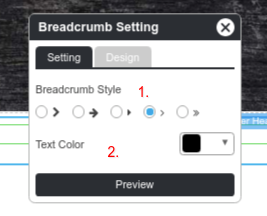
- Select a design of arrow.
- Select a text color.
Next and Previous: Visitor can click to see a next post and previous post.

Next and Previous Buttons Setting

- Select a design of arrow.
- Select a text color.
Manage your Blog index
A main blog page can access by domain.com/blog. This page is a blog dashboard where a visitor can see your all blog post as a thumbnail.
You can moditfy this page by clicking Site -> Blog tab -> Blog page.

Blog index widget section
There are 2 widgets section, Category list and Recent Post, allow to add in a blog index. Beside, you are able to adjust a blog list widget to display a thumnails of all posts.
Blog List Setting

- Title: Insert your Title.
- Enable/Disable a total of posts
- Limit a number of post which diaplay on the list
- Order by: Select Newest, Post Title or Last edit to arrage a list.
- Enable/Disable author name on each post.
- Enable/Disable post date and time on each post.
- Enable/Disable show catagories on each post.
- Enable/Disable show a first paragraph on each post.
- Continue Reading text is a button to access a post page.